We are trying to better integrate the WILDS WDL Library with Dockstore. We’ve been able to upload workflows with relative ease (see this collection), but there is still a large part of that repository called “modules” that don’t really fit the Dockstore “workflow” paradigm. Specifically, they are collections of common tasks that can be imported and executed within other workflows, but don’t actually contain a workflow and aren’t executable on their own (see “modules/ww-bwa/ww-bwa.wdl” in the repo as an example).
This structure makes me think that modules fit more neatly under the Dockstore “tools” paradigm. Is that possible? I know there’s some guidance out there recommending not to add WDL’s as tools, but this seems like an exception. Curious to hear what you folks think, happy to provide more details if needed! Thanks for your help!
It’s worth a shot. The general recommendation is due to how WDL does not have a strong tools vs workflows separation as compared to CWL where they are explicitly different types of entities. You also will not be able to run them directly in Terra. However, if you feel that your modules are more like tools and listing them on Dockstore is more to make them visible to other workflow developers you can give it a shot.
Basically, you register them via the github app similar to workflows and they should appear in the separate”my tools” and “tools” section of the site.
Do give us a shout if you run into issues (or even if you don’t). This isn’t a heavily used corner of Dockstore so we are curious how it turns out and we would like to give a hand as well if you do run into issues.
A quick heads-up, I looked into this and it seems that there is a old forgotten validation decision that stands in the way here. We’ll need to do a quick tweak on our end to enable this use-case.
Gotcha, thanks for the heads up, and thanks for taking a look at our PR! We’ll keep an eye out for that tweak to be merged and add those modules to Dockstore once you’re ready.
I noticed that the PR you mentioned has been merged to main, do you think we’re good to try adding those WILDS WDL modules as tools in Dockstore? Or is there still more testing planned?
We’re planning on deploying Wednesday afternoon, along with a couple other fixes we’re testing. WDL tools seem to work. If you’re curious you could test on https://staging.dockstore.org/ with a fork (as to not confuse production). Otherwise, we would recommend merging on Wednesday.
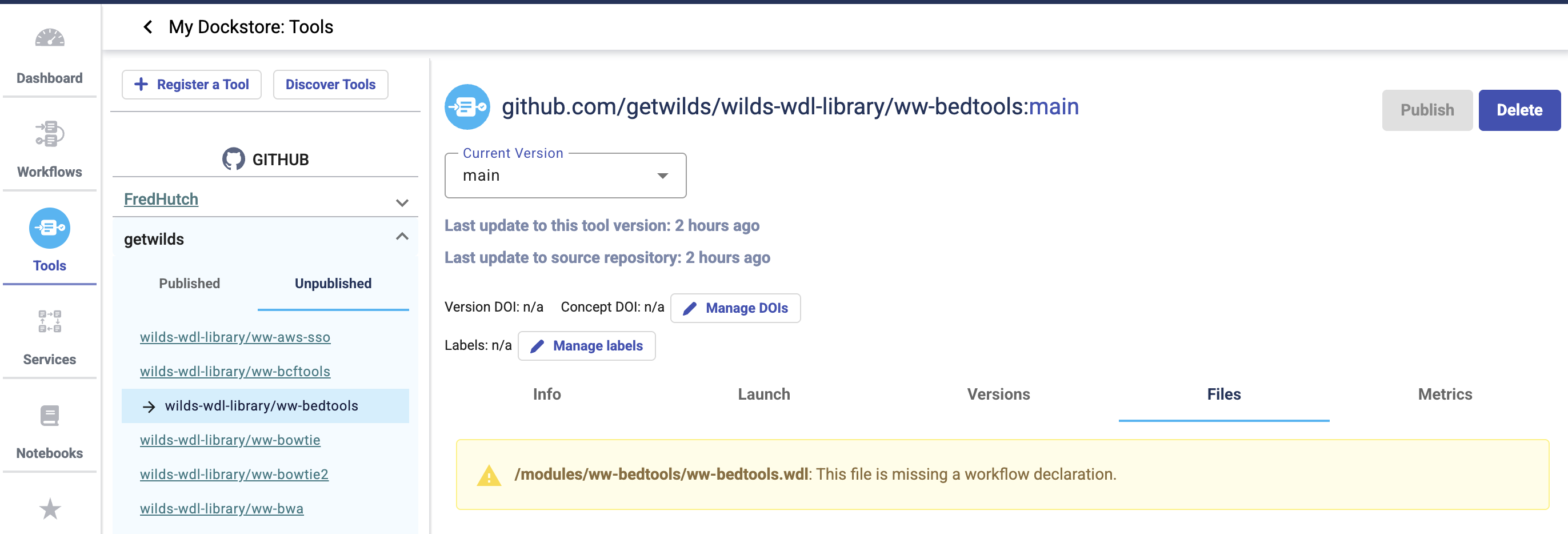
Okay, merged the PR and Dockstore is recognizing the modules as tools. However, a little over half of them run into an issue with publishing to our WILDS WDL Library collection. As you can see in the screenshot below, the “Publish” button is grayed out and a warning appears on the “Files” tab about the file “missing a workflow declaration” which is intentional on our side. The weird thing is that the other half of the modules worked fine even though they too don’t have workflows. Any suggestions on how to handle this? Maybe we can just delete and reupload to try again?
I took a look and I think this is deterministic (i.e. deleting and retrying should give the same result).
The message is a little misleading, we’re relying on a check in the Cromwell code that checks whether a task is callable/executable. In other words, even if a tool doesn’t need to be a workflow, we’re still checking whether it can be run (i.e. a side effect of our philosophy that things on Dockstore should be capable of being run reproducibly) . cromwell/wom/src/main/scala/wom/executable/WomBundle.scala at 063911695ffe93be183b419e17669fb956d475ab · broadinstitute/cromwell · GitHub I also lucked out(?) and tested with some of your tools that were runnable (not a wdl expert, but this seems to boil down to one task with a command section per wdl).
For example, looking at one of the failing modules, attempting to run ww-gatk.wdl in cromwell, I got
.MaterializeWorkflowDescriptorActor$$anon$1: Workflow input processing failed: Cannot convert WOM bundle to executable. No primary callable was available.
That said, I saw a testrun.wdl in the same directory and that seems to work (both in terms of running in Cromwell and registering in Dockstore) albeit as a workflow and not a tool (I also needed to delete the tool before registering as a workflow).
Sorry for not noticing this earlier.
Are there enough of those to cover all the modules that did not work?
No worries at all! Gotcha, I see what you’re saying. Each module has a testrun.wdl that is used as a “unit test” of sorts within our repo’s CI/CD, but it doesn’t really reflect the true functionality of the module as an importable tool, so I hesitate to use those.
In the meantime, I think I found a workaround! Using ww-bwa as a test case, I added a small workflow to the module script, literally just containing the meta section. This enabled the “Publish” button, so I published the module and added it to the WILDS WDL Library collection.
From there, I just removed the dummy workflow in the repo, which triggered an update for the tool in Dockstore and reproduced the warning, but left it published in the collection. I think this should work for us for now, that sound okay to you?
See the ww-bwa tool for the example in question: Dockstore